Proofpoint Phishing Simulations
Proofpoint Phishing Simulations
Every year, threat actors look for new ways to bypass your security defenses. As one would expect, different languages, cultures, and levels of digital maturity mean some places are more vulnerable than others.
Here are a few highlights:
- Of all EMEA countries, Swedish organizations were the most likely to suffer a successful phishing attack, at 94%.
- The Netherlands was the most targeted for cyber attacks by both insiders (86% vs 66% global average) and outsiders (84% vs 68% global).
- Only 35% of German organizations train their employees on insider threats.
Phishing is a major headache for information security professionals. As attackers move away from infrastructure and focus on people as targets, phishing emails are becoming the leading social engineering channel. And more popular phishing email types like impostor or business email compromise and ransomware are making this problem even more challenging for security teams to manage.
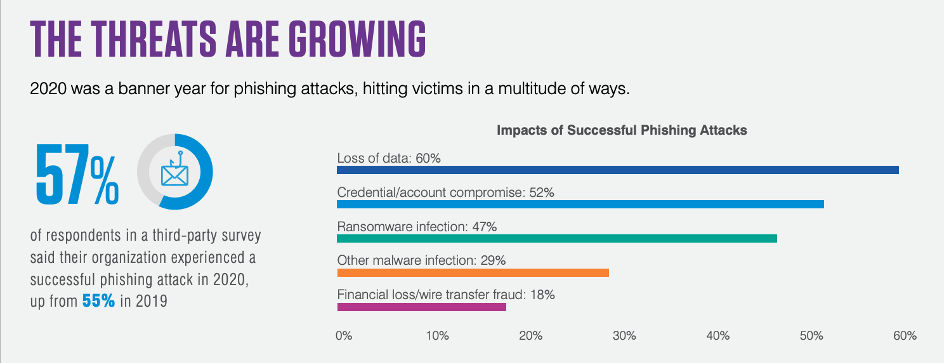
Effective technical email security controls are essential. However, many information security professionals also want to focus on how their people react to what appears to be a malicious message. That’s why phishing simulations have become such popular components of well-rounded security awareness programs.
What are phishing simulations?
Phishing simulations are emails that appear to be malicious but aren’t sent by real attackers and don’t contain malicious content. IT and information security departments typically send these emails to users in their organization as a test to see how they will react.
The software supporting phishing simulations typically measures how many and which users view, click, download, reply, enter credentials or (best-case scenario) report the message with a phishing reporting tool.
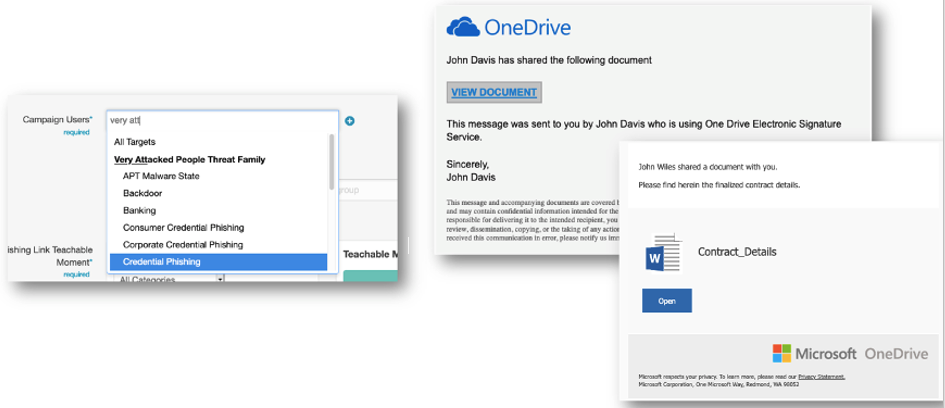
Figure 2: Examples of Proofpoint phishing simulation tool templates
Our phishing simulation tool lets you choose from thousands of templates, including examples of actual attacks using real brands seen by Proofpoint threat intelligence. You can also send simulations to populations like Very Attacked People (VAPs) or users who have engaged with known malicious content.
If users do click, enter information into a fake landing page or download attachments, they can be presented with a landing page, usually providing tips and telling users it’s a simulation.
Be forewarned, though, that users may view this landing page for only a few seconds. The typical user reaction is to close out of these pages as quickly as possible. So, these pages are not ideal as standalone educational components.
Why conduct phishing simulations?
It’s common for people to think that bad things happening in the world can’t happen to them. But the phishing simulations that users fall for can lead to that critical “Aha!” moment when users realize that they can, indeed, be compromised.
As phishing attacks become more targeted and trickier to spot, creating the concept of vulnerability is important to help drive the “why” of your security awareness program. Users understand after falling for one simulated phishing attack that they could be susceptible to a real attack.
How should your organization perform?
The “click rate” or “failure rate,” which is the percentage of users who engage with phishing simulations, is a common way to measure security awareness. And in our ‘Proofpoint Phishing Report 2023, we found the average “failure rate” for our customers’ users is around 10%.
But that’s only one dimension to measure program success.

In addition to the click rate, measuring the reporting rate, or percentage of users who report a simulated phish, is a great way to:
- Show users are taking positive actions, not just avoiding negative ones.
- Report up to key stakeholders and put your program in a more positive light.
- Demonstrate potential impact when suspicious messages slip through perimeter defenses; by reporting messages, users reduce further exposure to attacks.
When you have users consistently click or fail less than 5% of the time, and report more than 70% of simulated messages, you’re performing exceedingly well compared to most organizations.
What are best practices for phishing simulations?
We have several recommendations, provided below, based on our experiences helping thousands of our customers to run phishing simulations smoothly.
Before you go live:
- Safelist appropriately and run a test to a handful of staff in your department to make sure the phishing simulations are delivered as intended.
- If you have a help desk or similar internal service, give them a heads up about the simulated phish before you send it out; do this every time.
- Consider keeping another designated group of people in the loop about the simulation, such as human resources, high-level management or others, as appropriate.
- If you’re sending a simulated phish mimicking another internal department, request that department’s permission and get them to approve the final content.
- For simulations reaching international audiences, consider finding stakeholders in those areas who are familiar with the culture and can review phishing simulation content to ensure it’s relevant.
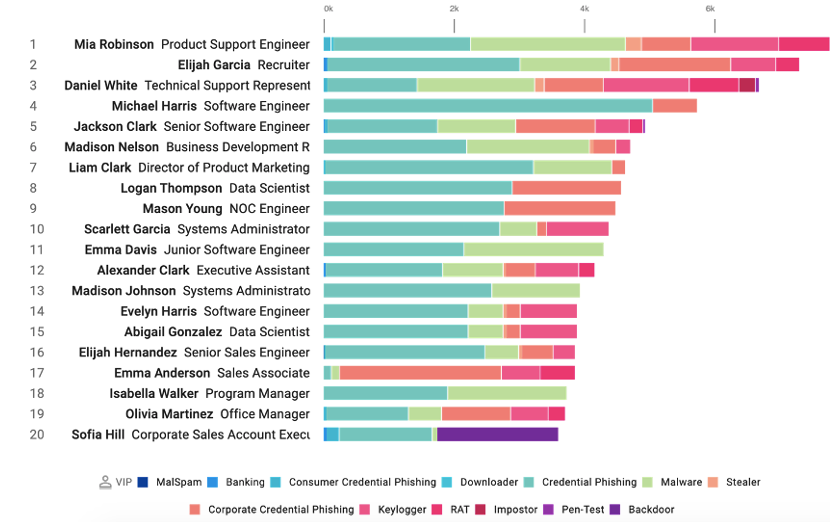
Figure 4. Sample data showing a VAPs report in the Proofpoint Targeted Attack Protection advanced email security dashboard; this data can guide phishing simulations and education to create a focused program with impact.
Starting your phishing simulation program
When you send your first simulated phish, send users to a 404-error page to get a solid baseline of user vulnerability to start. Then, after you’ve sent this “blind phish”:
- Send a notification introducing users to the program and goals; see if the message can be sent by your chief information security officer (CISO) or chief information officer (CIO) or another C-level executive.
- Next, identify your most attacked people or users engaging with real attacks to focus your simulations or provide more targeted risk-reduction efforts to these populations.
- And finally, work with other departments or colleagues to measure real security impacts from users before and after the program is implemented to demonstrate the return on investment for your efforts — such as computer remediations from malware, successful phishing attacks and credential breaches.
As your program progresses
Ensure you have a good cadence. We recommend at least one phishing simulation every 4-6 weeks, and more if possible. As your program evolves, you’ll want to:
- Send more targeted phishing attacks — for instance, use specific templates based on real attacks for certain departments and populations like VAPs.
- Consider auto-enrolling users who fall for simulations in education to build their skills.
- Implement a phishing reporting tool to make it easy for users to report suspicious messages.
For users who are “repeat clickers,” consider having a one-on-one meeting to understand why they’re engaging with potentially malicious messages and to reiterate the importance of your program. Also, be sure to share stories about or reward users who are reporting simulations or even actual attacks. That can gamify your program and encourage more positive behavior.
Next steps for successful security awareness programs
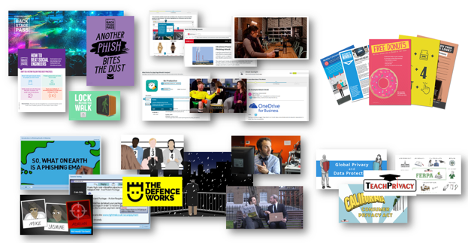
Figure 5. Sample content from hundreds of computer-based training modules and educational materials available from Spmbrella via Proofpoint.
It’s important to think of phishing simulations as one component of an effective and ongoing security awareness program. Be sure to also provide engaging security awareness content, webinars, in-person sessions and other components to engage users and drive behavior change. (You can take a deeper dive into best practices with our Managed Security Awareness and Threat Simulation program mSAT.)
If you’re looking for a Proofpoint Essentials Security Awareness partner to drive positive behavior change, Spambrella can help you gauge the strength of your program and the risk of your people with our free People Risk Assessment.
Or, if you have limited resources to run a program, consider the Managed Security Awareness Programs from Spambrella. Our programs are led by experts who have worked on hundreds of programs with organizations of all sizes.
Further Reading

Managed Security Awareness Training

Proofpoint Essentials Distribution

Ethical Phishing: Testing Your Employees
Features
- Thousands of phishing templates
- Real-brand lure examples
- Very Attacked People targeting
- Teachable moment landing pages
- Auto-enrollment after failed simulations
- Click-rate and reporting-rate metrics
- Weekly template updates
- Multi-language campaigns
Benefits
Phishing simulations show whether people are really recognising risky messages and help build the moment of awareness that drives better behavior.
Measuring reporting behavior is just as important as click rate because it demonstrates users are taking positive action when suspicious messages slip through.
Run realistic simulations regularly to establish a baseline, benchmark progress and keep your awareness program current with evolving threats.
FAQ’s
Frequently asked questions
What are Proofpoint Phishing Simulations?
How do phishing simulations differ from real attacks?
Why should we run phishing simulations?
Can we target high-risk users (VAPs)?
What happens when a user clicks a simulated link?
How do we measure success?
Can users report simulated emails?
Are there multilingual phishing templates?
Is employee data private during simulations?
Does it work with Microsoft 365 and Google Workspace?
Can we use real brand logos in simulations?
How often should we run simulations?
What if employees get upset about being “tricked”?
Is there a free trial?
How is Spambrella different from direct Proofpoint?
Run realistic simulations, benchmark risk and build a stronger reporting culture across your business.
Talk to Spambrella about campaign design, baselining and follow-up training.






Some Of Our
Favourite Success Stories
We are a new Spambrella partner and we are deploying it to all of our customers using Office 365, Hosted Exchange, and Linux mail hosting customers. The management platform is quick to learn and effective and affordable. Our customers like it much better than previous spam filtering tools.

One Step Closer To Greater Protection
Latest Blog Posts

Securence Is Shutting Down: What Customers Need to Know — and Where to Go Next
If you rely on Securence for email filtering, hosted Exchange, or continuity services, it’s time to start planning your exit. Securence’s parent company, US Internet (USI), has confirmed…

AiTM Phishing: When MFA Is Not Enough for Microsoft 365
AiTM Phishing: How Attackers Bypass MFA and What You Need to Defend Against It Multi-factor authentication is one of the most widely recommended controls in enterprise security. Most…
QR Code Phishing (Quishing): How It Bypasses Your Email Filters
There is a version of a phishing email that your gateway almost certainly cannot read. It arrives with a clean sender reputation, no suspicious links in the body,…
Get a quote…