
Email Security
Can we withdraw a bidder’s access to an encrypted tender email?
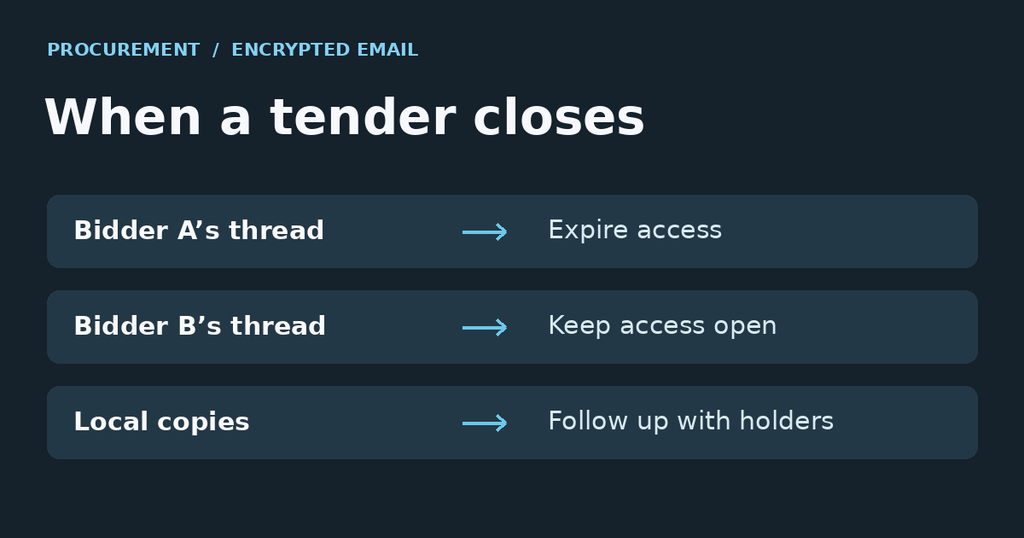
At ten on Monday morning your surveyor tells you that a different contractor has won the job. The unsuccessful bidder already has an encrypted email with the site drawings. Can you close their access today? With the thread expiry feature in Spambrella’s documented Proofpoint Essentials encryption experience, an authorised administrator or the person who started the thread can do that. The decision to record separately is what the contractor may already hold. Here is how to test both parts before you send a real tender pack.
Decide what the recipient needs when the job ends
Start with the document and the people who use it. A bidder may need to study a drawing during a site visit, ask questions and keep a copy of its own quotation. The client may want access to the original drawings to end when the tender closes. Write those requirements down together. If the site manager expects the bidder to print the drawings for a visit, account for those paper copies in the handover. A change in the email portal cannot collect a printout from a van.
Give the decision to a named person. On a tender that might be the procurement lead, who knows exactly when the award becomes final. Give the technical action to the original sender or a delegated administrator with appropriate rights. Agree how one will contact the other if the award date moves or the sender is on holiday. Recording “expire when tender closes” leaves a gap if the only person who receives the award notice is working on another site that afternoon.
Distinguish the link, the conversation and the copy
Spambrella’s guide to the updated encryption experience describes a single-use link for external readers, a read receipt and a separate control for expiring the whole thread. The guide says encrypted messages can be accessible for up to 30 days in that experience. The single-use link and the thread have different lifetimes. A link that has already been used tells you little about whether the underlying conversation is still available. Check which product and reader your customer actually has before quoting an access period.
Think through what happens when the recipient reads a drawing. The portal controls subsequent access through the service. A recipient who has already saved an authorised copy, printed a page or transcribed a measurement holds information elsewhere. UK buyers assessing how information is protected after delivery can use the ICO’s guidance on encryption during data transfer and encryption during storage. Ask the supplier who will look after any permitted local copies and how they will be disposed of when the work ends.
Run a dummy tender from the bidder’s side
Create a harmless one-page drawing with a made-up project name and revision number. Use two external test mailboxes that your organisation controls. Send one encrypted conversation to each mailbox using the method approved for the customer’s service. Keep the subject matter innocuous and give each conversation its own reference. Separate threads let you test a practical requirement that often gets overlooked. Can the losing bidder’s access end while the winning bidder still has its pack?
Ask each tester to work from the notification they receive on the device they normally use. Have them read back the revision number and send a short reply through the secure reader. At the sender’s end, match the reply with the correct bidder and check what the read receipt shows. The revision number establishes that the tester saw the intended content. The reply establishes that the person could act on it. An automatic receipt alone gives procurement less information than either of those checks.
Note how a returning reader obtains access after the first link has been used. Have the tester demonstrate that route once while the conversation is still live. You will use it again after expiry. Otherwise, a test that ends with an error could simply be showing you what happens when someone clicks an old single-use link twice. Write the observed steps in the service desk notes so that a different engineer can reproduce the check.
Expire one conversation and keep the other open
Ask the administrator or original thread owner to find the first test conversation in Log Details. Match the recipient, reference and sending time before choosing the expiry action. Spambrella documents this as a thread-wide control. If several organisations share one thread, expiring it affects the conversation they share. Individual conversations are a better fit when the procurement lead expects to close access for different bidders on different dates.
Record the time of the action and look for the documented log status, Delivered (Expired). Have the first tester leave the reader and attempt fresh access through the route they tested earlier. Record what they can see. Then ask the second tester to reopen their separate conversation and identify its revision number again. The pair of observations lets the buyer sign off both sides of the request. One bidder has lost fresh access to the pack, and a bidder who still needs it can continue working.
Give the buyer a short record they can use at the next project review. Include the drawing revision, the two test references, who closed the first thread and who confirmed access to the second. A screen capture of the log status can support the record if it excludes link tokens and unrelated messages. Beside it, write the business outcome in plain English. That last line is what the project manager needs when deciding whether to use the service for the next tender.
Give the service desk a usable answer on Monday morning
Suppose the buyer calls to say the wrong firm received the pack. Ask for the recipient address, the sending time and a reference that identifies the thread. Keep the sensitive attachment out of the support ticket. Follow the customer’s incident process, bring in the authorised owner promptly and record the expiry action and its outcome. Preserve the opening and reply information that is available. If you cannot establish whether someone saved a copy, say so in the incident record.
A request from the legitimate winning bidder needs a different response. The contact may have used an old notification, lost access to their mailbox or changed role. Confirm the intended recipient against the project contact list using an established route. If the project owner approves renewed access, identify the current drawing revision before issuing it through the approved channel. Procurement then has one record connecting the old thread, the reason for the change and the version the replacement contact received.
Make the supplier demonstrate the acceptance test
When reviewing Spambrella’s service packages, ask which package and platform support the reader and expiry controls you need. Bring the dummy drawing to the demo and ask to watch from the bidder’s screen as well as the administrator’s. Include whoever will cover procurement during leave. If only the salesperson can complete the demonstration, the buyer still needs to establish who will have the necessary permissions on a working day.
Finally, agree how the organisation chooses which messages to encrypt in the first place. Spambrella’s guide to email data loss prevention explains how policy can trigger protection on outgoing messages. Test that decision with the same harmless example, using an approved test rule if required. File the results alongside the procurement procedure. The next time a tender closes, the owner should be able to identify the right thread, end access, confirm the other bidder can still work and explain exactly which copies need following up outside the portal.